A digital coach: Designing a learning panel for a complex enterprise tool
Help enterprise users navigate a highly technical workflow without leaving the app.

## The Team & Goal
**Goal:** Reduce support tickets related to "how-to" questions by providing just-in-time guidance.
**Team:** Content Designer (Me), UX Researcher, Frontend Engineer, Product Manager.
## Process: Research
We conducted 5 semi-structured interviews with power users to identify pain points. The results were synthesized in a Mural board using rapid-fire interviewing techniques and dot-voting exercises.
## Process: Prototype
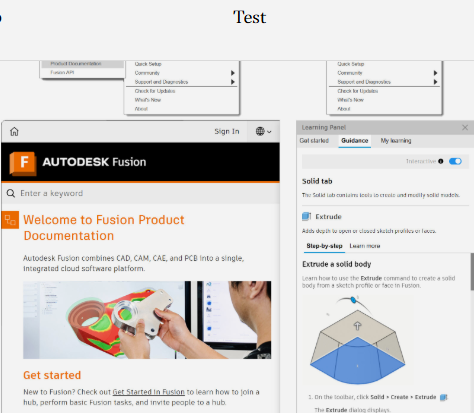
I designed a collapsible "Learning Panel" in Figma that triggers dynamically based on the user's current tool selection.
## Process: Develop & Test
We established a Context ID architecture to align in-product strings with online documentation content seamlessly.
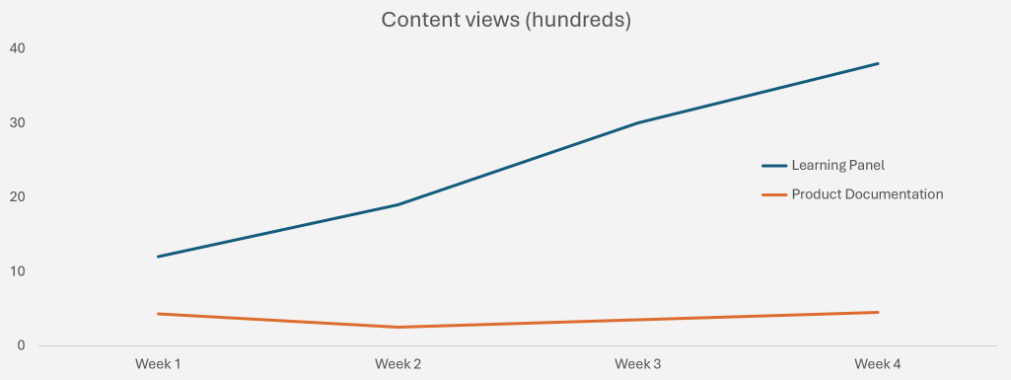
Iterating on content clarity based on usability testing, we changed the CTA from "Help" to "Quick Guide", resulting in a significant increase in engagement over traditional documentation search.
## Results & Iteration
Within the first month, we saw a **20% reduction in support tickets** for the featured toolset. For future iterations, I proposed expanding the panel with additional modal tabs (like "What's New" and specialized "Onboarding" tracks).